
An aging computer often thinks as quickly as it ever did, yet every click seems to wait on something grinding beneath the keyboard. That wait usually lives in storage, where a spinning platter hunts for fragments while newer flash memory answers almost instantly. Replacing that one part can make a tired machine feel startlingly youthful again. Knowing when the swap helps, and when something else is the bottleneck, saves wasted spending.
Upgrade money gets wasted in predictable ways, and most of them begin with a guess. Owners buy the part a neighbour praised, or the part on sale, without asking which component actually causes the daily waiting. Storage is the right answer surprisingly often, but the honest route starts by clearing away the myths that send people shopping in the wrong direction.
Myths That Keep Old Machines Spinning Slowly
The first myth says an old computer is slow because it is old, full stop. Age alone rarely grinds a machine down. What grinds it down is a storage device that must physically hunt for every fragment of every file, while the processor sits idle waiting for the hunt to finish. A computer that boots slowly, opens programs slowly and saves slowly, yet runs fine once everything is loaded, is usually describing its drive, not its age.
The second myth claims that tidying software will restore lost speed. Cleanup tools have their place, and removing genuine clutter frees space, but no amount of tidying changes the physics of a spinning platter. When the drive itself is the bottleneck, polishing the files on it is like organising the shelves of a library whose only staircase is broken. The queue shortens a little; the staircase stays broken.
The third myth insists that a nearly full drive just needs sterner deleting before any upgrade is considered. A crowded drive does deserve a calm clear out, yet people in a hurry delete the wrong things, lose files they wanted, and still end up with the same slow platter underneath. Freeing space helps a drive breathe, but it cannot give a mechanical device the instant answers that flash memory gives by design, and confusing those two fixes wastes both time and files.
A final myth warns that changing a drive means losing everything and starting from an empty desktop. It does not. The contents of the old drive can be copied across wholesale, or a fresh system can be installed and the files brought over deliberately. Either route is routine, and fear of it keeps many perfectly good machines crawling for years longer than they need to.
How Spinning Platters and Flash Storage Really Differ
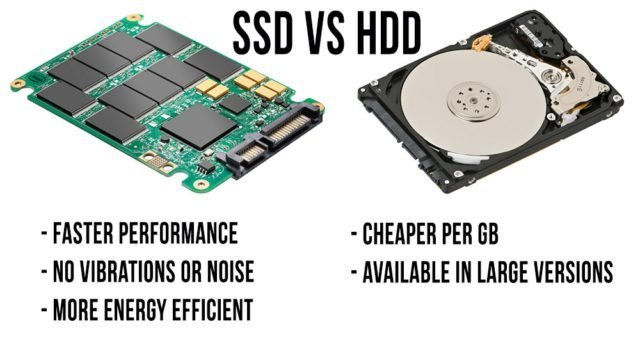
A hard disk drive stores data on a spinning platter coated with a magnetic surface, and a moving head must travel to the exact spot where each fragment lives before it can be read. When a file sits in one tidy stretch, that travel is brief. When years of saving, deleting and updating have scattered the file across the platter, the head darts back and forth collecting the pieces, and every dart costs time you can hear as a faint grinding patience test.
Flash storage works on an entirely different principle. There is no platter, no head and no travel, because the data lives in memory cells that are reached electronically. Ask for any fragment and the answer comes back almost at once, in whatever order the fragments are requested. That single difference explains why a machine fitted with flash storage wakes quickly, opens heavy programs without ceremony, and no longer pauses while the drive catches up with your clicking.
The comparison usually begins when a crowded drive forces a decision, and knowing the mistakes cleaning a full hard drive involves, plus the wider full hard drive cleanup mistakes picture, prevents rushed deletions before any upgrade. A drive groaning at the seams pushes owners toward hasty housekeeping, when the calmer sequence is to back up, clear space deliberately, and then judge the hardware on its merits rather than in a panic.
The difference shows most in the small moments rather than in grand benchmarks. Waking from sleep, opening a browser with many tabs remembered, searching a crowded folder, saving a large document while something else loads: each of these asks the drive for many small pieces in quick succession. A platter answers them one journey at a time. Flash answers them nearly together, and the whole computer feels calmer for it. None of this makes the older technology foolish, since the platter design served computing for decades and still has honest work to do, which the discussion below takes up.
There is also the matter of how each technology ages in daily service. A platter drive slows in a way you can watch, as files scatter further and the head journeys lengthen year by year, which is why an old machine feels slower than the same machine did when new even though nothing inside it changed. Flash storage holds its pace far more evenly, because its answers never depended on travel in the first place, so the speed you feel on the first day is close to the speed you feel years later.
Where a Hard Drive Still Earns Its Place
Capacity is where the mechanical drive quietly wins. The Wikipedia entry on hard disk drive technology notes that mechanical drives still deliver the cheapest capacity for bulk archives, backups and media libraries, and that advantage matters when the job is simply to hold a great deal of data safely. A family film archive, a lifetime of photographs, or a rolling backup of everything else fits the platter perfectly, because those files are written once and read occasionally.
Many owners therefore end up with a partnership rather than a winner. Flash storage runs the system and the programs used daily, where its speed is felt constantly, while a spacious hard drive, internal or external, keeps the archives where cheap room matters more than instant answers. The old drive from an upgraded machine often begins a second life exactly this way, holding backups inside an inexpensive enclosure.
There are also jobs where the drive barely matters at all. A computer used purely as a spare, a machine that streams everything and stores nothing, or one waiting to be retired within months may not justify any spending. The sensible question is never which technology is better in the abstract, but which one matches the work this particular machine still has ahead of it.
Noise and vibration belong in this honest accounting too. A mechanical drive announces its work with a faint hum and the occasional chatter of its moving head, and in a quiet room that soundtrack grows wearing across a long day. None of that makes the drive a poor archive, since an archive mostly sits silent and still, asked for its contents only now and then. Judged on the work it is actually given, the platter remains a sensible, economical servant.
Cloning or Fresh Installing Without Losing Files
Whichever route you choose, the backup comes first. Copy the important files to somewhere separate from the machine, and confirm the copy opens before touching the hardware. The Wikipedia entry on solid-state drive technology explains that flash storage has no moving parts and reaches data far faster than a platter that must move a head to each fragment, which is the prize waiting on the other side of a careful afternoon of copying.
Cloning copies the entire old drive onto the new one, system, programs, settings and files together, so the machine wakes up as itself, only quicker. It suits owners who are happy with their setup and simply want it faster. The cloning software handles the copying, the drives are swapped, and the computer boots from the flash drive as though nothing changed except the waiting.
A fresh install takes the opposite philosophy. The system is installed clean onto the new drive, programs are added back deliberately, and files are copied over from the backup. It takes longer, yet it leaves behind years of accumulated clutter, half forgotten utilities and settings nobody remembers choosing. For a machine that has grown messy as well as slow, the clean start often feels like the larger half of the upgrade.
Either way, keep the old drive untouched for a while after the swap. It is your safety net if a file was missed, and only once weeks of normal use have passed without anything missing should it be wiped and reassigned to archive duty. That patience costs nothing and removes the one real risk in the whole project.
Spending Once on the Upgrade That Matters Most
Maker comparisons from Kingston describe the trade off plainly: speed, silence and shock resistance on one side, low cost per unit of capacity on the other. Neither side of that sentence is a trick. Flash storage costs more room for room, and in return it removes the mechanical waiting that defines an old machine daily experience, while also shrugging off knocks that would trouble a spinning platter in a laptop carried from room to room.
Endurance worries deserve a calm answer too. Endurance ratings for consumer flash drives exceed what typical home use writes across many years, so the ordinary pattern of documents, photographs, browsing and updates will not wear one out in any timeframe worth planning around. The fear of a short lived drive belongs to an earlier generation of the technology and to far heavier workloads than a household produces.
So the spending rule is simple. If the machine waits on its drive from the moment it wakes, put the money into flash storage sized for the system, the programs and the files in daily use, and let a hard drive handle the archives. If the waiting comes from somewhere else, spend nothing until you know where. One upgrade, chosen from evidence rather than hope, is what turns a tired computer youthful again, and it is cheaper than the string of small purchases that guessing usually produces.
Finally, judge the result by the waiting you no longer do. The true measure of the upgrade is not a number on a screen but the vanished pauses: the machine ready when you sit down, the program open before impatience forms, the save that finishes while you are still thinking about it. When those moments add up across every day the machine still serves you, the single well chosen purchase explains itself, and the myths that delayed it look as expensive as they always were.


