
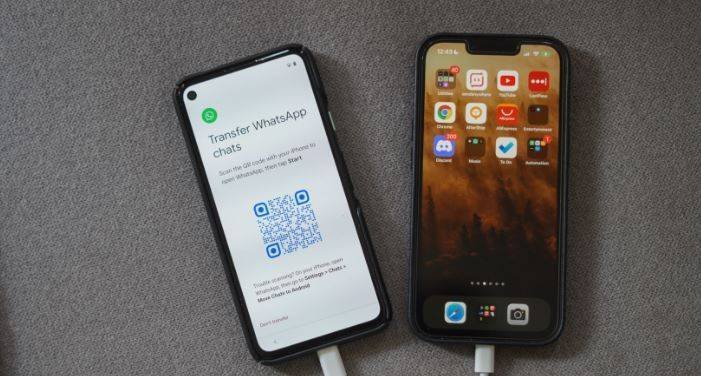
That old Android holds birthdays, family arguments, voice notes from people you miss, and jokes nobody else would understand. Leaving it behind feels fine until you realise your whole chat history lives inside it. Crossing to an iPhone no longer means abandoning those threads. Handled in the right order, your conversations travel with you and land intact.
Getting Both Phones Ready Before Anything Moves
Preparation decides more than the transfer itself. Start with the Android handset, because it holds the original conversations and remains the only complete copy until the crossing finishes. Open the chat app, let it settle, and make sure everything you care about is visible inside it: scroll into older threads, open group conversations, and confirm the media you value is present. Charge the handset, clear a little breathing room in its storage if it is nearly full, and resist any urge to tidy chats away. Deleting threads before a move simply deletes them from the copy that travels.
The receiving iPhone needs its own preparation, and its condition matters more than its model. Apple support guidance explains that the receiving iPhone needs to be new or reset to factory settings for the setup stage that carries chats across to appear at all. A brand new handset qualifies naturally. One that has already been set up and used does not, however new it feels, until it is reset, which is why the final section below deals with that situation separately. For now, know which situation you are in before touching anything on the Android side.
Moving between phones on the same system is the simpler cousin of this cross platform move, so readers who are not switching systems can follow guidance on how to transfer WhatsApp chats to a new phone instead of the longer route described here. That link belongs in this preparation phase because choosing the right route is itself a preparation step. Same system moves lean on cloud backups tied to one account. Crossing systems does not, and confusing the two routes leads people to make exactly the wrong kind of backup, as the next paragraphs explain.
Gather the small essentials while nothing is yet in motion. Both handsets will need the same wireless network, both will need power within reach, and the new handset will need activation with the same phone number used on the old one, because WhatsApp help material describes that same number as part of its supported route. Find the charger cables now, confirm you know the wireless password, and set aside an unhurried stretch of time. A transfer begun in haste, between other errands, with a battery fading, invites the kind of interruption that forces a restart from the beginning.
Starting the Crossing During iPhone Setup
The crossing begins inside the iPhone setup itself, not inside the chat app, and that surprises many people. As the new handset walks through its opening stages, it offers choices about where its content should come from, and moving from an Android handset is one of those choices. Reaching that stage is exactly why the receiving phone had to be new or freshly reset. Choose the Android route when it appears, and the two handsets begin speaking to each other through a companion app on the Android side.
WhatsApp help material, available through the WhatsApp Help Centre guidance on moving chats to iPhone, explains that its supported route for carrying conversations across from an Android handset to an iPhone relies on the Move to iOS app during iPhone setup, with both handsets on the same wireless network and connected to power. That single sentence carries the whole method: the app on the old phone, the setup stage on the new one, the shared network, and the cables plugged in. Treat those conditions as requirements rather than suggestions, because the route was designed around them.
During the handover, the Android handset asks which kinds of content should travel, and the chat app appears among the choices. Select it, along with anything else you want carried across, and then let the two phones work without interference. Screens may sit quietly for stretches that feel long, and progress may move in uneven steps. Leave both handsets alone, keep them near each other and near the router, and do not start signing into accounts or exploring the new phone early. Patience during this phase protects everything the preparation phase arranged.
If the setup stage passes without the Android choice being taken, the crossing cannot simply be added afterwards from inside the chat app, because the supported route lives at that setup moment. That hard truth is why preparation emphasised the state of the receiving phone so strongly. A missed stage means resetting the iPhone and walking through setup again, which is annoying but recoverable, provided the Android handset still holds the untouched original. Nothing has been lost as long as the old phone remains unchanged, which is the deeper reason for treating it gently throughout.
Bringing Chats Across and Signing In
Once the transfer stage completes, the iPhone finishes its setup and the chat app can be installed or opened on the new handset. Sign in using the phone number the account already holds from the Android device, since the account, and the history attached to the crossing, is recognised through that number. Verification arrives in the usual way, and after it the app presents the transferred material for restoration into place. Follow the prompts slowly, and let the app finish building its indexes before judging what is present or missing.
The Wikipedia entry on WhatsApp describes how the app accounts and backups differ between the two phone systems, which is why a backup made through Google Drive cannot be restored directly onto an iPhone. Each system keeps its reserve copy in its own cloud, in its own format, under its own account, and the two reserves do not interchange. This is also why the crossing had to happen handset to handset during setup rather than through a backup restore afterwards. Understanding that difference saves people from wiping a phone in the false hope that a cloud copy will simply pour into it.
Know what travels and what stays behind, so the arrival can be judged fairly. WhatsApp notes that messages, group threads, media, and profile details do move, while items such as call history do not. A missing call list, then, is expected behaviour rather than a failed transfer, and the same calm standard should be applied to small differences in how older media is organised. The heart of the archive, the conversations themselves and the things shared inside them, is what the supported route was built to carry.
Keep the Android handset safe and untouched even after the new phone appears complete. Its copy is insurance, not clutter. If something turns out to be missing or damaged on the iPhone side, a recovery attempt can only begin from an old handset that still holds the original archive. Treating that backup as insurance rather than a restore path matters too: the old phone cannot pour its copy into the iPhone directly, but its untouched state keeps every retry possible. Only retire, trade in, or wipe the old handset after the checking phase below has been finished properly.
Checking Old Conversations Once They Arrive
Verification deserves the same care as the transfer, because discovering a gap weeks later, after the old phone has been wiped or given away, turns a fixable problem into a permanent loss. Begin with the conversations that matter most: family threads, close friends, and any group whose history carries practical weight. Open each one, scroll back well beyond the recent messages, and confirm that older exchanges are present in full sentences rather than as lonely fragments. Check photographs and voice notes actually open and play, since a thumbnail is not proof that the file behind it arrived.
Then sample widely rather than deeply. Dip into threads from different years, different groups, and different corners of your life, the way an auditor samples records instead of reading every page. Old group threads are especially worth testing, because their size and age stress the transfer more than a short recent chat does. Note anything absent as you go, in writing, while the old handset is still beside you. A written list turns worry into a defined problem, and a defined problem can be weighed calmly against the effort of repeating the crossing.
When the Destination Phone Was Already in Use
The awkward case is the iPhone that has already been lived in: set up months ago, filled with its own photographs, apps, and messages, and now expected to receive an Android chat archive. As the preparation section explained, the setup stage that carries chats across appears on a new or freshly reset handset, so an already used iPhone cannot simply receive the crossing where it stands. The choice it presents is real, and it deserves a clear head rather than a hopeful workaround found in a forum.
Before deciding anything, protect what the iPhone already holds. Make its own backup thoroughly, in its own cloud or on a computer, and confirm that backup completed. Photographs, notes, and messages gathered since the phone was set up are worth exactly the same respect as the archive waiting on the Android side. Resetting without a verified backup trades one archive for another, which is the opposite of what this whole exercise exists to achieve. Nothing in the crossing route excuses carelessness toward the destination phone own history.
If the iPhone own content is safely backed up and the chat archive matters enough, the honest route is a factory reset followed by the same setup crossing described earlier, after which the iPhone own material is restored around the newly arrived chats. That is a significant undertaking, and it is entirely reasonable to decide against it. Some people keep the Android handset as the archive keeper, start fresh conversations on the iPhone, and accept a divided history as the price of avoiding a reset. That choice is not a failure; it is a judgement about what their time and risk are worth.
Whatever is decided, decide it with the facts in view rather than on promises from unofficial tools. Paid transfer software is easy to find and bold in its claims, and nothing in the supported guidance recommends it, so any such route is a gamble taken without the makers backing. The supported path is narrower but honest: prepare carefully, cross during setup, sign in with the same number, check thoroughly, and keep the old handset untouched until the archive has proven itself in its new home. Handled in that order, even this harder case ends with conversations intact and no archive sacrificed along the way.


