
Few sights sting like a low battery warning appearing halfway through a journey, a shift, or a family day out. Most people assume the handset itself is simply weak. Usually the real story is a collection of small settings quietly spending charge all day long. Change the handful that matter and the same handset suddenly feels far more generous.
The pattern in the pages ahead is a simple one: each section names a wrong turn people habitually take, then shows the steadier way and why it works. None of the steadier ways involve buying anything, installing miracle savers, or promising a set number of extra hours, because honest battery advice cannot promise that. What it can do is stop the quiet leaks that waste charge you already have, and slow the wear that shortens the working life of the battery itself. Those are two different goals, saving the day and saving the years, and both matter.
Where a Day of Charge Quietly Leaks Away
The first wrong turn is hunting for one villain. Owners blame a single app, a single update, or a single bad battery, and chase that one suspect while a dozen small drains continue untouched. Real days of charge leak away through accumulation: a bright screen, a radio searching for signal, apps refreshing in the background, location checks repeating, mail arriving the moment it is sent, and a handset kept warm in a pocket against the body. Each drain alone looks trivial. Together they decide whether the evening ends with charge to spare or with a warning.
The steadier way begins with looking rather than guessing. Both major phone systems include a battery page that shows which apps and activities have drawn the most charge over the recent past, and that page deserves a slow read before any setting is touched. Sometimes it names a genuine offender, an app working far harder than its usefulness justifies. More often it confirms that the screen and the everyday favourites are the main spenders, which points the effort toward habits and settings rather than toward blame. Evidence first is a dull slogan, yet it prevents the wild setting changes that often follow a bad battery day.
Screen Habits That Waste More Than You Think
The screen is usually the largest single spender, and the habitual wrong turn is leaving it at full brightness everywhere. Indoors, under ordinary lighting, full brightness buys almost nothing in readability while costing heavily in charge, yet many handsets sit there all day because a sunny moment outdoors once demanded it and nobody turned it back down. Advice from Apple on maximising battery performance explains that screen brightness influences endurance, and the practical reading of that advice is simple: let brightness follow the room, not the brightest moment of the week.
Automatic brightness exists for exactly this, and for most people it judges rooms better than hurried human thumbs do. Where it misjudges, a quick manual dip indoors still helps more than a permanently fixed high setting. The companion habit is the screen timeout, the pause before the display sleeps after the last touch. A long timeout leaves the brightest part of the phone glowing at pockets, desks, and kitchen counters after every glance. Shortening that pause is painless, because the screen wakes instantly when wanted, and the saved minutes of pointless glow add up across hundreds of daily glances.
Battery care, like many lasting improvements, succeeds or fails as a daily routine long before it becomes a technical fix, and small habits repeated every morning are what quietly change outcomes over months, much as deciding whether to make your bed every morning as an every morning habit shapes a room without any single dramatic effort. Nobody transforms battery life in one heroic settings session. They set brightness to follow the room, shorten the timeout once, and then let those small decisions repeat themselves hundreds of times, which is precisely how routines outperform resolutions.
Dark mode deserves an honest word rather than a slogan. Reference material on display technology notes that dark mode saves meaningful power on screens where dark pixels draw little or no current, because those pixels genuinely rest. Screens with a constant backlight gain far less, since the light behind the panel keeps shining whatever the picture shows. So the steadier advice is conditional: if your handset has the kind of screen where dark pixels rest, dark mode is a real saving worth using; if it does not, dark mode remains a comfort for the eyes, and should be enjoyed as that rather than trusted as a battery measure.
Background Work, Location Checks, and Mail Fetching
The next wrong turn is treating background activity as either harmless or as an enemy to be crushed entirely. Apps that refresh constantly, track location repeatedly, and fetch mail the instant it arrives spend charge while the screen is dark and the owner is thinking about something else. Yet the popular counter habit, closing every app by hand after each use, does not save power in the way people hope. A closed app must be loaded fresh next time, which costs its own energy, and the system is designed to manage resting apps efficiently. The battle is not against background work itself, but against background work that earns nothing.
The steadier way is selective restriction. Guidance in the Google Support guidance on making an Android battery last points to adaptive battery and restricted background use for hungry apps as everyday levers, and that pairing captures the right philosophy: let the system learn which apps you actually use, and confine the rest. Walk the app list asking one plain question of each entry, whether it needs to act while you are not looking. A messaging app earns its background life. A shopping app, a game, or a rarely opened utility rarely does, and restricting those few changes the overnight and idle drain noticeably.
Location checks follow the same principle. Navigation needs precise, frequent location while it is guiding you, and almost nothing else does. Many apps ask for location around the clock when they only need it while open, if they need it at all. Setting location permission to apply only while an app is in use, and denying it where no honest purpose exists, trims a steady background spender without breaking anything the owner values. Weather is the classic fair case: a rough location, checked occasionally, serves perfectly well, and a precise constant watch serves the app maker more than the forecast.
Saver Modes Used Early Rather Than in Panic
The wrong turn with saver modes is treating them as an emergency ritual, switched on in alarm when the warning appears and the day is already nearly lost. By that point the charge that background restraint would have saved is spent, and the saver can only ration what little remains. Saver modes work far better as a plan than as a rescue. Switching one on at the start of a long journey, a festival day, a shift without sockets, or any stretch where charging is uncertain protects charge while there is still charge worth protecting.
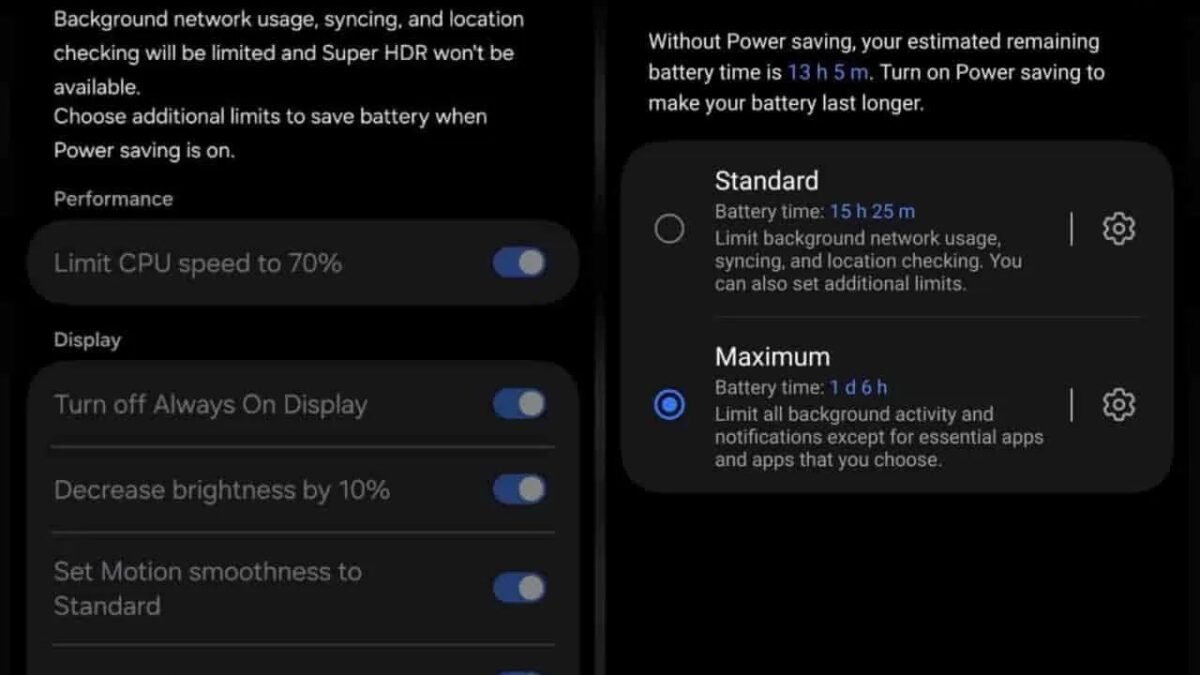
Understanding what these modes actually do removes the fear that keeps people from using them early. A saver mode generally dims the screen effort, slows background activity, delays mail and syncing, and trims the small constant work that idles a battery down. Messages and calls still arrive, maps still guide, and photographs still take; what pauses is the behind the scenes bustle. The handset feels almost entirely itself, which is why early use costs so little. Waiting until panic, by contrast, pairs the same restrictions with anxiety and a nearly empty battery.
There is a middle habit worth building between full freedom and full saver: the honest glance ahead. Owners who know a day will be long can charge fully before leaving, switch the saver on at departure rather than at desperation, and relax the background settings of the worst apps for that day alone. None of this requires a new personality, only a moment of foresight at the door. Travel days, in particular, repay that foresight, because they combine weak signal, heavy map use, photographs, and screens read in bright outdoor light, nearly every drain in this piece arriving together.
Charging Routines That Keep a Battery Young
The final wrong turn concerns the years rather than the day: treating charging as something to complete as fast as possible and leave sitting full for as long as possible. Batteries age fastest under a combination of heat and time spent at full charge, and the common routine of plugging in at bedtime and leaving the handset full and warm until morning delivers exactly that combination, night after night. The owner notices nothing for a long while, because wear is gradual, and then blames age alone for a decline that routine quietly hurried along.
The steadier routine is gentler without being precious. The Apple Support page on maximising battery performance explains that optimised charging softens overnight wear by finishing the final portion close to waking time, so the handset spends fewer hours sitting full. Switching that feature on, where a handset offers it, is the single easiest charging improvement most owners can make, since it demands no change in behaviour at all. Beyond it, simple courtesies help: charge on a hard, cool surface rather than under a pillow, and free the handset from a thick case while it charges if it tends to grow warm.
Put the day and the years together and the whole picture is modest, which is its strength. Let brightness follow the room, shorten the screen timeout, restrict the background habits of apps that earn nothing, grant location sparingly, fetch most mail on a schedule, reach for saver mode at the start of long days rather than the end of them, and charge gently with optimised settings doing the overnight thinking. No single item on that list performs a miracle, and none was promised to. Together, repeated daily, they stop the quiet leaks, slow the wear, and make the same handset feel, as the opening said, far more generous.



One comment