
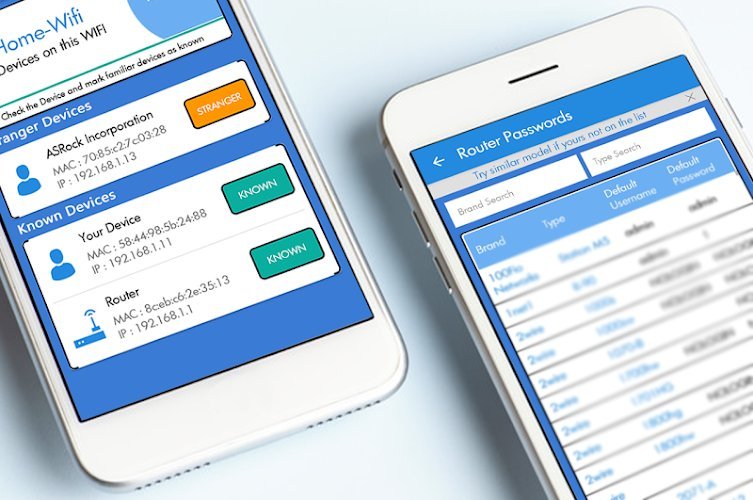
The device list on a family router can read like a guest book from a party nobody remembers throwing. Printers, plugs, watches and televisions all linger there under cryptic names beside the phones you expected. Among that crowd, a genuine intruder can hide surprisingly well. Sorting friend from stranger takes a household census, a fresh password and a few days of patient watching. None of that requires special skill, only a calm order of work and a willingness to write things down as you go.
A home network grows quietly. A relative connects during a visit, a new appliance joins during setup, an old tablet wakes up after months in a drawer, and each arrival leaves a line on the list. Over time nobody remembers which line belongs to what, and that fog is exactly what makes people nervous when they finally look. The answer is not panic, and it is not ignoring the list either. The answer is a slow census, carried out in phases, where every entry earns its place or gets removed.
Phase One: Listing Everything Currently Connected
Start by opening the router settings and finding the list of connected devices. Router documentation from major makers describes client lists showing names, addresses and connection bands for everything currently attached, so expect a mixture of friendly names, blank labels and strings of characters that mean nothing at first glance. Resist the urge to remove anything yet. Removal before understanding only creates confusion, because a gadget you kicked off will try to return and look like a fresh mystery.
Copy the whole list somewhere safe, on paper or in a plain note, exactly as it appears. Write down each name, each address and which band it uses, and leave space beside every line for notes. A screenshot helps too, because lists change as devices sleep and wake. This written record becomes your working document for the next phases, and it saves you from relying on memory when the list starts looking different after changes.
Note also which entries seem to come and go. Phones, watches and laptops sleep, and sleeping devices often vanish from a live list only to reappear later. A line that blinks in and out across an evening is behaving like an ordinary household gadget, not like something hiding. Mark those patterns down. Patience at this stage pays off, because the phases that follow depend on knowing the difference between a device that left and a device that was never yours.
Phase Two: Matching Entries to Gadgets You Own
Now walk the house with your list in hand and match every entry to something physical. Work room by room. Name the television, the printer, the speaker, the console, the plugs and bulbs and doorbells, and tick each one off as you confirm it. Ask everyone in the household what they own and what they connected, including the spare phone in a drawer and the tablet a child uses for school. Most mystery lines surrender during this simple walk.
Wearables are classic mystery entries, since a smartwatch connected to a phone often appears as its own line on the list, which is why reading about smartwatch connected devices at home helps owners finish the census without chasing their own wrists. The same goes for earbuds cases, fitness bands and reading lights with wireless features. If a gadget can join the network, it probably has, and it probably did so under a name its maker chose, not a name you would recognise.
One modern habit causes endless false alarms, so understand it before judging any leftover lines. Networking references explain that phones now randomize their hardware addresses per network for privacy, which can make one handset appear as an unfamiliar entry. In plain terms, your own phone may present a fresh looking identity to your own router, even though nothing has changed hands. A line that tracks with a family phone, appearing when it wakes and vanishing when it leaves, is very likely that phone wearing its privacy disguise.
By the end of this phase your list should split into three honest piles: confirmed household devices, lines explained by the random address behaviour of phones you own, and a small remainder that nobody can claim. Keep the remainder small and specific. Write down when each unexplained line was last seen and whether it seems active or dormant. That remainder, and only that remainder, is what the next phase deals with, and dealing with it does not require blocking tools or guesswork.
Phase Three: Changing the Password and Reconnecting
The cleanest eviction tool a household owns is its own password. Guidance published as CISA guidance on securing wireless networks advises households to secure wireless networks with strong encryption and a unique password, noting that changing the password disconnects every device at once. That total disconnection is a feature, not a nuisance. It empties the room completely, so that only people and gadgets you invite back can return.
Choose a new password that nobody outside the household could guess and that your family has never used anywhere else. Long and plain beats short and clever. Write it down and keep it somewhere private at home while everyone reconnects, because the next hour involves typing it into televisions, printers and plugs, some of which make typing miserable. Work through your confirmed list one gadget at a time, reconnecting each and watching it reappear on the router list under a name you now recognise.
Reconnect in a sensible order. Start with the router facing essentials, then phones and computers, then the entertainment and smart home pieces. As each device returns, tick it off and note its fresh line on your census. Anything that cannot reconnect because nobody remembers owning it stays outside, which is exactly where an unclaimed device belongs. If a genuine household gadget gets missed, its owner will complain soon enough, and you can reconnect it knowingly rather than by accident.
Expect this phase to take longer than you hoped. Some gadgets hide their network settings deep in menus, and some need their saved network forgotten before they will accept a new password. Treat that friction as the cost of certainty. When the reconnection round is finished, the list should contain only devices you personally welcomed back, plus perhaps the privacy disguised lines of family phones. Everything else has been shown the door without any confrontation at all.
Phase Four: Blocking Repeat Offenders and Guest Access
If an unclaimed line tries to return after the password change, something is wrong, because it should not know the new password. Before assuming the worst, rule out the ordinary causes. A neighbour you once helped, a relative who was given the old password years ago, or a gadget of yours still holding old settings can all explain a knock at the door. Ask around first. Many repeat offenders turn out to be forgotten kindnesses rather than intruders.
Routers offer blocking tools aimed at specific addresses, and they have a place, but understand their limits. Reading the Wikipedia entry on MAC address clarifies that a hardware address is an identifier a device presents to a network, and the same references note that address based blocking alone is weak, since hardware addresses can be imitated by a determined intruder. Blocking a line may silence a nuisance, yet it is a fence with a known gap, not a wall. Lean on the password as your real barrier and treat blocking as a tidy up tool.
Guest access deserves its own decision in this phase. Many routers can run a separate guest network with its own password, and moving visitors onto it keeps your main list short and your main password closely held. When guests leave, their lines leave with them, and you can change the guest password freely without disconnecting the whole house again. Households that entertain often find this single habit ends most future census confusion before it starts.
Also review which of your own devices truly need to be connected at all. An old printer, a retired streamer or a smart plug serving nothing can be taken offline for good, shrinking the list and removing lines you would otherwise puzzle over next time. A shorter list is easier to defend and far easier to understand at a glance. The goal of this phase is not a fortress. It is a household where every remaining connection has a reason.
Phase Five: Rechecking the List Over Coming Days
A single clean evening proves little, because devices sleep, travel and return. Recheck the list at different times over the coming days: once in the morning, once in the evening, and once at a weekend when the house is full. Compare each look against your census notes. New lines should be explainable on the spot, usually as a family phone wearing a randomized address or a gadget someone reconnected and forgot to mention.
Keep the census somewhere the household can find it, and update it whenever a new gadget arrives. Writing the name and the date beside each addition takes seconds and saves a whole investigation later. Families who keep that habit stop fearing the device list, because it becomes a register they maintain rather than a riddle they dread. When a gadget is sold, given away or thrown out, cross its line off and remove its access if the router allows saved entries to be cleared.
If an unexplained line keeps returning despite a fresh password, guest separation and honest checking, take the concern further. Update the router software, confirm encryption is set to a strong modern option, and consider whether the password may have been shared more widely than anyone admits, in which case changing it again and sharing it more carefully is a reasonable step. A line that survives all of that deserves help from the internet provider or the router maker, and your written census will make that conversation far easier.
Most households never reach that point. For most, the story ends quietly: a list that once looked like a stranger filled guest book becomes a short register of familiar things, each one claimed by name. The intruder fear fades because evidence replaced it. Keep the password strong, keep the census current, and glance at the list now and then with the same calm you would check a locked door, briefly and without worry.


