Voice memos are where good intentions go to be forgotten. You record a two-minute brain dump while driving, walking the dog, or standing in the grocery store — a contractor to call, a birthday gift idea, three work tasks, half a thought about vacation flights — and then the recording sits in an app you never open again. The idea was captured, but it was never turned into anything you can act on.
AI closes that gap in about a minute. Modern phones can transcribe your memo automatically, and a chatbot can then sort the transcript into a clean, prioritized to-do list with deadlines pulled out and vague thoughts separated from actual tasks. This guide walks through the whole workflow, from recording a memo the AI can actually understand to the exact prompt that produces a useful list.
Quick Answer
Record your voice memo as usual, get it transcribed — most phones now do this automatically in their voice recorder app — then paste the transcript into an AI chatbot with a prompt asking it to extract actionable tasks only, group them by area of life, pull out any dates or deadlines mentioned, and flag unclear items separately. Review the result, fix anything the transcription garbled, and move the final list into your real to-do app. The whole process takes two to five minutes and works with free tools.
Step 1: Record a Memo the AI Can Work With
Transcription quality decides everything downstream. A few habits make a dramatic difference:
- Get closer to the microphone and reduce background noise. A memo recorded over highway wind will transcribe into creative fiction. If you are in a car, wait for a stop or hold the phone closer.
- Speak in short bursts. Pause between separate thoughts. A tiny silence is the audio equivalent of a paragraph break, and both transcription tools and AI sorters use it.
- Say the category out loud. Starting a thought with “Work —” or “House —” gives the AI a free organizing system. “House: call the plumber about the kitchen faucet” sorts itself.
- Spell out tricky names. “Email Priya — P-R-I-Y-A — about the lease” prevents the transcript from inventing a “Priya” who becomes “Maria” in your task list.
- State deadlines in full. Say “by Friday the fourteenth,” not “by Friday,” because by the time you process the memo you may not remember which Friday you meant.
None of this requires speaking like a robot. Thirty seconds of mild structure at recording time saves several minutes of cleanup later.
Step 2: Get the Transcript
You have three main routes, and the best one is usually already on your phone:
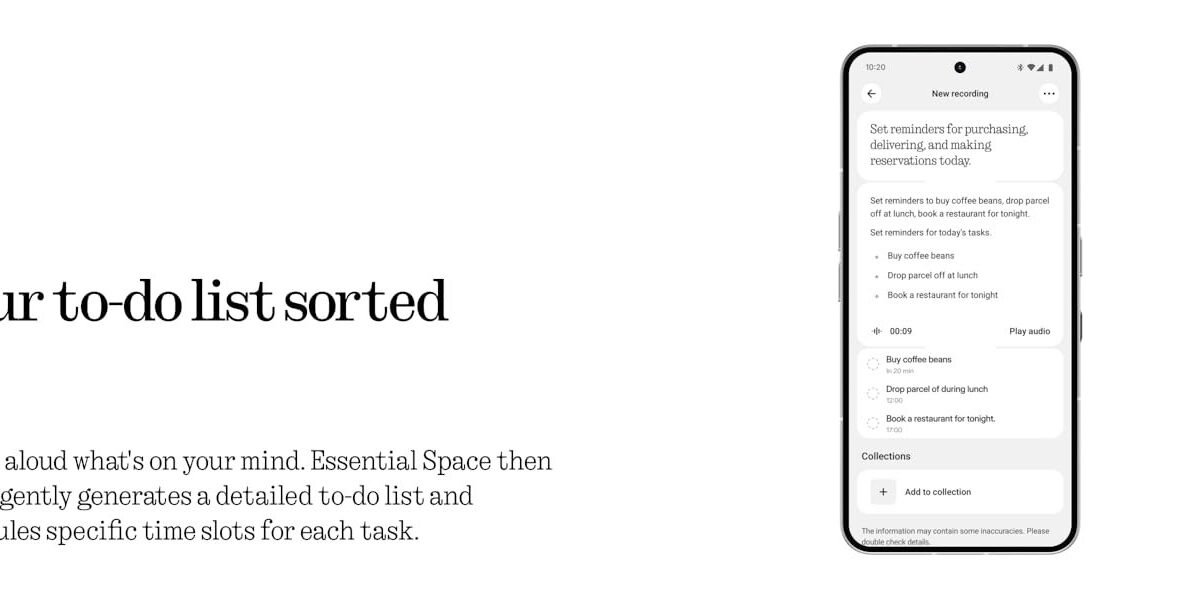
- Built-in transcription: Apple’s Voice Memos app on recent iPhones transcribes recordings automatically, and you can copy the text directly. Google’s Recorder app on Pixel phones does the same, with speaker labels. Samsung’s Voice Recorder offers transcription on recent Galaxy models.
- Dedicated transcription apps: Services like Otter, the AI transcription platform, specialize in this and handle longer recordings and meetings well, with free tiers that cover casual memo use.
- AI apps directly: The ChatGPT and Gemini mobile apps accept voice input and audio uploads on many plans, letting you skip a step — dictate or upload, and ask for the list in the same breath.
The built-in routes have a privacy advantage worth noting: Apple’s transcription happens on-device for supported models, so a memo about your finances or health never leaves your phone until you choose to paste it somewhere.
Step 3: Use the Right Prompt
Pasting a transcript and saying “make this a to-do list” produces a mediocre list — usually just your sentences chopped into bullet points, rambling included. A specific prompt produces a genuinely useful one. Use something like this:
“Here is a transcript of my voice memo. Turn it into a clean to-do list. Extract only things I actually need to do. Group tasks under headings: Work, Home, Personal, Errands. If I mentioned a date or deadline, add it in brackets after the task. Put anything that is an idea rather than a task under a separate ‘Ideas / Maybe’ heading. If anything is unclear, list it at the end under ‘Unclear — needs my input’ instead of guessing. Here is the transcript: [paste]”
The “instead of guessing” instruction matters. Without it, AI will confidently turn “call that guy about the thing” into a specific invented task. With it, ambiguous fragments get quarantined where you can deal with them honestly. This same discipline — give the model the raw text, define the output structure, and forbid invention — is what makes AI effective on longer material too, a workflow covered in depth in our guide to summarizing long documents with AI in minutes.
What a Good Result Looks Like
Feed the AI a typical ramble — “Okay so don’t let me forget, I need to call the dentist because that tooth thing, and oh the car inspection is due sometime this month, also Sarah’s birthday is coming up I should get her that book she mentioned, work-wise I have to send Marcus the budget draft before Thursday’s meeting, and maybe we should look at flights for October, not sure yet, and buy more of those light bulbs for the bathroom” — and a good output separates it cleanly:
- Personal: Call the dentist about the tooth issue; Buy a birthday book for Sarah
- Errands: Get the car inspected [due this month]; Buy bathroom light bulbs
- Work: Send Marcus the budget draft [before Thursday’s meeting]
- Ideas / Maybe: Look at flights for October
Notice what happened: nothing was invented, the half-formed flight thought went to Ideas instead of becoming a task, and the two deadlines survived. That sorting judgment — task versus idea versus unclear — is the part that used to require you to sit down and think, and it is the part AI now does in seconds.
Step 4: Move It Into Your Real System
An AI-generated list left sitting in a chat window is just a cleaner version of the forgotten memo. Finish the workflow:
1. Skim and correct. Transcription errors love names, numbers, and dates. Thirty seconds of review catches nearly all of them.
2. Transfer the tasks into whatever you actually use — Apple Reminders, Google Tasks, Todoist, a paper notebook. Copy them over; do not leave the chat as your system of record.
3. Add real reminders for anything with a deadline, at the moment you transfer it.
4. Delete or archive the memo once processed, so your recorder app stays a capture inbox instead of an archive of guilt.
If you process memos daily — many people brain-dump on a morning walk — this becomes a two-minute routine: record, transcribe, prompt, transfer, done.
Common Mistakes to Avoid
- Treating the transcript as accurate without reading it. “Call the plumber Tuesday” can become “Call the plumber, two’s day?” — always skim before acting, especially on anything involving money, medication, or other people.
- Pasting sensitive memos into random free tools. A memo about a medical issue or a work conflict deserves the same caution as any private document. Prefer on-device transcription for sensitive material, and check what a third-party app does with your audio before using it.
- Letting the AI over-organize. A fourteen-category taxonomy with priority scores for a nine-item list is procrastination dressed as productivity. Groups and deadlines are enough.
- Recording one giant weekly memo. Ten thoughts across three days buried in one four-minute recording is where deadlines get lost. Several short memos are easier to transcribe, sort, and clear.
- Skipping the review step entirely. The AI’s list is a draft. You are the editor, and the editing pass — especially moving ideas out of the task list — is where the list becomes trustworthy.
Conclusion
The voice memo was never the problem; the missing step was processing. Transcription turns your ramble into text, a well-built prompt turns text into sorted, dated, honest tasks, and a two-minute transfer puts those tasks where they will actually get done. Set up the habit — speak with a little structure, quarantine the unclear items instead of letting the AI guess, and always do the final skim yourself — and the memos you record on walks and in parking lots will finally start finishing things instead of just remembering them.
FAQ
Can I do this completely free?
Yes. Phone built-in transcription (Apple Voice Memos, Google Recorder, Samsung Voice Recorder) is free, and the free tiers of ChatGPT and Gemini handle a memo transcript easily — it is a small amount of text. Paid plans only become relevant if you are processing very long recordings daily.
What if my memo is long, like 20 minutes?
Split the work. Transcribe the full recording, then process the transcript in chunks of a few minutes each with the same prompt, and merge the lists. Long single prompts increase the chance the AI drops items from the middle of the transcript, which is exactly where your most forgettable tasks tend to hide.
How accurate is the transcription, really?
On clear audio in a quiet environment, modern transcription is typically 90–95% accurate or better — good enough that a skim catches the errors. Accuracy drops sharply with wind noise, multiple speakers talking over each other, heavy accents the model handles poorly, and technical vocabulary. Names and numbers deserve a deliberate double-check every time.
Is it safe to use AI for memos about work or health topics?
Use judgment. On-device transcription keeps audio on your phone, which is the safest route. Once you paste a transcript into a cloud chatbot, it is processed on that service’s servers under its privacy policy. For genuinely sensitive topics, redact names and specifics before pasting, or process those memos by hand.