
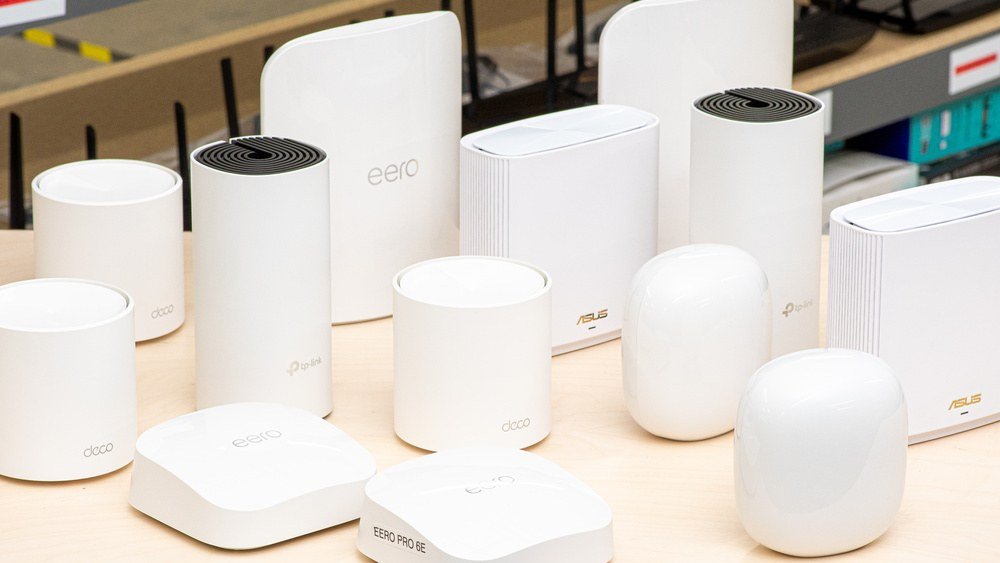
One router in a corner cannot reach every room in a modern home, and the answer is not a louder box, it is several small ones working together as a single network. A mesh system swaps that lone router for a small set of units that share one network name, and a phone moves by itself to the strongest unit as its owner walks around, because each unit passes data along for the others instead of creating a separate slower network. What you need is short: a two- or three-unit kit from a known brand, the modem your provider supplies, and a phone for setup. This piece covers the kit choices that keep the bill low, what the labels mean in plain words, the rest of the shopping list, how to place the units, and how to lock the network down.
The Short Answer
A mesh network is a small set of units that act as one router spread across the house. The main unit plugs into the modem, the other units sit in the rooms that need signal, and the units talk to each other so every corner of the home shares a single network name. Your phone moves by itself to the strongest unit as you walk from room to room, with no manual switching and no second network to join. A two- or three-unit kit suits a typical family home, and the mesh Wi-Fi system in a two-story house walkthrough shows how to stagger units across floors when the house has stairs. Setup runs through a phone app and takes about a quarter of an hour, and reusing the old network name and password lets every device reconnect by itself. Before spending anything, test the speed while standing beside the router: if the numbers are already poor there, the fault sits with the plan or the line, and no kit will fix it. Mesh solves coverage, not a weak connection from the provider.
Why One Box No Longer Covers The House
Homes have grown harder for a single router to cover. Walls of brick, plaster, and concrete eat signal, long ranch layouts stretch it thin, and two floors double the distance it must travel. A single box tucked in a corner of the living room was fine when one laptop shared the connection, but a modern home runs phones, tablets, televisions, and a shelf of smart gadgets at once, and the corners of the house go quiet. Range extenders look like a fix, but they create a separate slower network with its own name, and your phone clings to a weak signal rather than switching on its own. Mesh works differently: each unit passes data along for the others, so the signal never has to make one long jump, and the network stays one network from the front door to the back bedroom. The Wikipedia page on mesh networking sets out how the units relay traffic between each other. A bedroom with no signal, a basement that buffers, and a call that drops whenever someone runs the microwave are the classic signs that coverage, not speed, is the problem, and that is exactly the problem mesh is built to solve.
Kit Choices That Keep The Bill Low
You do not need a flagship kit with a screen and a smart speaker built in. Solid budget kits from known brands sell for a modest sum in a three-pack, and often for less during big sale events such as Prime Day, Black Friday, and the back-to-school season. At that level you typically get the older or the newer wireless generation, which is plenty for streaming and calls, and for a home packed with smart devices. Refurbished previous-generation kits from maker outlets are another way to keep the bill low, saving a large share of what a new kit runs to, and they carry the same firmware support as a new box from the same maker. Unknown brands with no firmware updates are a security risk at any outlay, because an unpatched router leaves the whole home open no matter how little it ran to. Buy the kit that fits the home you live in, and put the saving toward a cable or two for the wired link described below.
Reading The Labels Without The Jargon
The labels on the box are simpler than they look. The newer wireless generation handles crowded networks better than the older one, so it is worth picking when the gap between the two is small, and a kit that supports it will stay useful longer as more gadgets join the home. Dual-band against tri-band matters less in a modest home: the extra backhaul radio in a tri-band kit helps mainly in very large homes, and in a typical family home it sits idle. Coverage claims on the box assume open space, so real-world reach runs to about two thirds of the advertised figure, and a kit that claims to cover a large house will in practice cover a middling one. Ethernet ports on each unit are a welcome extra, since linking even one unit to the main one by cable steadies the whole network a great deal. The Wikipedia page on wireless LAN explains the standards behind the generations, and why the newer ones cope better when many gadgets share the air. Ignore the rest of the label: the brand, the generation, the band count, and the ports are the four facts that decide whether a kit fits your home.
The Rest Of The Shopping List
Apart from the kit, there is little else to buy. A modem is part of the list when the provider has not supplied one. Most cable and fiber firms rent or sell a compatible unit, and the mesh main unit takes over from the old router while the modem stays in place. Setup needs a phone, since the maker app runs the whole configuration, and the same app handles placement checks and firmware updates later. Worth adding if you like: a pair of cheap Ethernet cables for a wired link between units, and a small shelf or a wall mount that holds a unit at chest height in an open area. No separate router is needed, no range extenders, and no professional installation. The whole job is a kit, a modem, a phone, and perhaps a cable or two, and the outlay stays modest when the kit comes from a known brand rather than a flagship line. Keep the box and the receipt until the network has run for a week, in case a unit needs swapping.
Placing The Units So They Work
Placement decides whether a mesh network sings or stumbles, and the rules are simple. Unplug the old router, link the main mesh unit to the modem with the cable from the box, then power it on. Get the maker app and work through its guided setup, which usually runs about a quarter of an hour, and it will ask for a network name and password. Keeping the old name and password means every gadget in the house reconnects by itself, with nothing to reconfigure. Place the second unit roughly halfway between the main unit and the dead zone, at least a room away, out in the open rather than tucked behind furniture. The app shows how strong the link between units is, and when it reports a weak one, shift the unit closer. Add the third unit the same way, then check speeds from a few rooms with the app test. Units belong in open areas at chest height, at least a room away from each other, never inside cabinets or behind televisions, and never directly above each other across floors. In a home with stairs, stagger the units so no two sit in a straight vertical line. Update the firmware on day one, when the app prompts you, and it is never worth skipping. When a single room is dead, moving the router a few feet can often fix it, and in a small flat under a thousand square feet a single good router sitting in the middle usually does the job better than a mesh kit.
Locking The Network Down
A fresh network is the right moment to lock things down. Pick the strongest security the kit offers, or the previous generation at minimum, with a long password you have not used anywhere else, sixteen characters at least. Swap the factory admin password in the app account, since it is the first thing an intruder tries, and switch on automatic firmware updates so security fixes arrive without you having to remember them. Switch on a separate guest network, so visitors and smart gadgets stay apart from your main devices and cannot reach the computers and phones that hold your files. Keep the network name neutral rather than personal, and never share the admin login with anyone who does not need it. A mesh network with strong security, fresh firmware, and a separate guest network is a quiet one, and the few minutes spent on these settings on day one save far more trouble than they take. Check the app once a month for updates and for devices you do not recognize, and remove anything unfamiliar.
Answers Readers Look For
What does a budget mesh kit run to? A reliable two- or three-unit kit from a known brand sells for a modest sum at regular times of year, and often for less during big sale events. Refurbished previous-generation kits from maker outlets save a large share of the bill, and they are the best value when the budget is tight. Is mesh better than a range extender? For whole-home coverage, yes. An extender creates a separate slower network that you must join by hand, while mesh units form one network and your phone moves to the strongest unit by itself, so there is no dead handover at the stairs or the back door. Can units from different brands work together? As a rule, no. Each maker’s system is proprietary, so mixing brands usually fails or forces the units back to basic extender behavior, and the fix is to keep every unit from one maker and one product line. Do you still need the provider router? You still need the modem, which often comes from your provider, but the mesh main unit takes the place of the old router. If the provider box combines modem and router in one, put it in bridge mode so the mesh unit does the routing and the two do not fight each other.



2 comments