
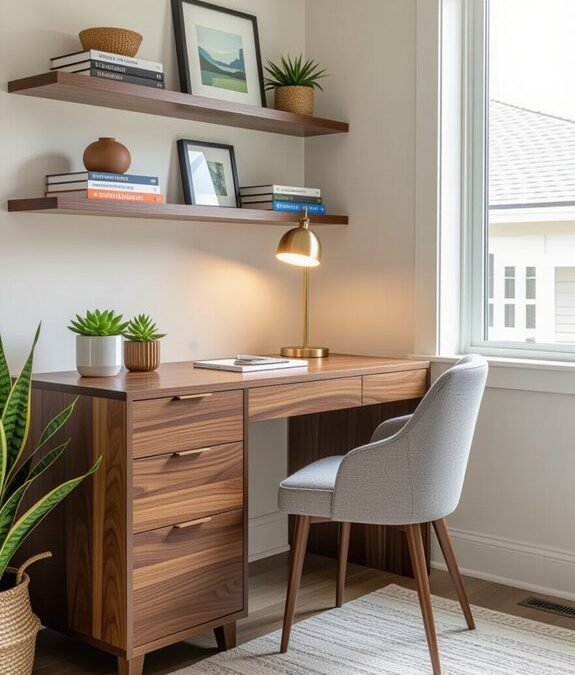
A spare room is a luxury many remote workers simply do not have, yet focus rarely depends on square footage alone. One well chosen corner can hold a desk, signal working hours to the household and close down cleanly each evening. Problems begin when posture suffers, calls look shadowy and papers creep across shared living space. Six careful decisions about light, boundaries, storage and shutdown turn borrowed floor space into a workplace that respects home.
A corner workspace succeeds once you start treating it as a small room with its own rules, rather than as furniture squeezed into leftover space. The sections that follow move in a deliberate order: choosing the corner, setting heights that protect the body, agreeing boundaries, preparing for calls, storing vertically, and shutting down so the home reclaims its space every single evening.
Choosing a Corner With Light Quiet and Power
Begin by walking the home at the hours you usually work and listening. Corners differ enormously across a day. A spot that feels peaceful at dawn may sit beside a busy kitchen by midday, while a hallway alcove may carry every footstep and door slam in the building. Choose the corner with the steadiest quiet, not merely the one that happens to be empty on moving day.
Light deserves equal attention. A position near a window offers daylight that lifts mood and helps video calls, provided the screen does not face harsh glare at noon. Side light usually works best, falling across the desk rather than directly onto the monitor or into your eyes. Test the corner at several times of day before committing furniture to it permanently.
Power and connection settle the practical side. You need enough sockets within safe reach, a stable internet signal, and space for a small lamp without trailing cables across a walkway. Choosing a dependable corner at home also sits alongside the broader question of flexibility, since many people now work remotely while traveling between homes and other locations, and the habits that make one fixed corner function well are the same habits that make remote work travel arrangements succeed anywhere.
Measure before buying anything. A compact desk, a chair that slides fully beneath it, and a few hand spans of clearance on each side may be all the footprint available. Sketch the corner, note where doors swing and radiators sit, and check that you can stand, stretch, and leave quickly without squeezing past furniture every time you need a glass of water.
Chair Screen and Keyboard Heights That Protect Posture
Posture problems in small workspaces usually come from improvisation. A dining chair sits too low, a laptop screen pulls the head downward, and a keyboard perched on a high table lifts the shoulders all day. Aches then get blamed on age or workload, when the real culprit is geometry that forces the body into a strained position for hours at a time.
The underlying discipline has a clear definition. According to Wikipedia on ergonomics, ergonomics is the discipline of arranging workplaces, products, and systems so they fit the people who use them safely and comfortably. Applied to a corner, that means adjusting the setup around your body, rather than folding your body around whatever furniture already happens to be nearby.
Set the chair first. Feet should rest flat, knees should sit roughly level with hips, and the lower back should meet real support, from a chair back, a cushion, or a rolled towel. Raise the seat with firm cushions if needed, or add a low footrest such as a sturdy box when feet dangle, since unsupported legs quietly pull the whole spine forward.
Then raise the screen. The top of the display should sit near eye level, at roughly an arm length away, which for most laptop users means a stand or a stack of stable books plus a separate keyboard and mouse. Keep the keyboard low enough that elbows rest near a right angle with shoulders relaxed, and take regular distance breaks during screen work to ease the strain of prolonged close focus.
Boundaries Signals and Sound Control for Focus
A corner without walls needs signals instead. A desk lamp switched on only during working hours, headphones worn during focus blocks, or a small sign agreed with the household can all mark the difference between available and occupied. Signals work when they are consistent and when everyone, including the worker, respects them during ordinary days.
Agree the household rules in a calm moment, not during an interruption. Children, partners, and housemates need to know which matters justify breaking in, which can wait for a break, and when the working day normally ends. A shared calendar showing call times helps, because many interruptions are simply scheduling guesses made by people who cannot see your commitments.
Sound control protects concentration in both directions. A rug under the desk, soft furnishings nearby, and a door closed where one exists all soften echoes and household noise. A small fan or gentle background sound can mask irregular noises such as traffic and plumbing, which the ear finds harder to ignore than a steady, predictable hum.
Protect your own attention with the same seriousness. Keep the personal phone in another room during focus blocks, close unrelated tabs, and let household pleasures wait for scheduled breaks. A corner workspace offers few physical barriers, so behavioural barriers carry extra weight. Breaks taken properly, away from the desk, make those barriers far easier to honour.
Lighting and Sound for Calls That Look Professional
Video calls reveal a corner to colleagues, so prepare the view deliberately. Face toward your main light source rather than letting a bright window glow behind your chair, which turns a face into a silhouette. A simple lamp placed slightly to one side, at about face height, evens out shadows and makes expressions easy to read on screen.
Check the background as others will see it. A plain wall, a tidy shelf, or a curtain reads calmly, while piles of laundry, unmade beds, and busy hallways distract from what you are saying. In a shared room, a folding screen or a rearranged bookcase can create a neutral backdrop that appears only during calls and disappears again afterwards.
The wider pattern of working this way has become ordinary. According to Wikipedia on remote work, remote work describes employees performing their jobs from home or other locations away from a central office. Professional presentation therefore no longer depends on a company building. It depends on small, repeatable choices about light, sound, and setting that any corner can support when they are planned.
Sound quality matters more than picture polish. A quiet corner, a headset with a decent microphone, and a habit of muting during long listening stretches will carry most calls well. Test recordings before important meetings, listen for echo, traffic, and appliance hum, and keep water nearby so a dry throat never forces an awkward scramble mid sentence.
Vertical Storage and Cable Order in Tight Footprints
Small workspaces fail horizontally, so store vertically. Wall shelves above the desk, hooks for headphones and bags, a narrow rack beside the chair, and stackable boxes all lift supplies off the work surface. Every item given a home above or beside the desk is an item that cannot creep across the keyboard during a busy afternoon.
Keep the desk surface for current work only. One notebook, the device in use, and a drink belong there during the day, while reference papers live in a single tray and finished material leaves the corner each evening. A clear surface is not decoration. It lowers the visual noise that makes a shared room feel permanently occupied by an unfinished office.
Cables deserve a single planned route. Run them along the wall or the back of the desk, gather them with reusable ties, and keep the power strip off the floor where feet and vacuum cleaners travel. Label the plugs once, and future changes become simple. Orderly cables also make the evening shutdown faster, which quietly supports the habit that keeps the whole arrangement liveable.
Choose storage that can close. Lidded boxes, a cabinet door, or even a cloth cover over a small shelf lets work visually disappear at the end of the day. Open storage displays every task still waiting, and in a living room or bedroom that display follows you through dinner, conversation, and rest, long after the working hours have ended.
A Shutdown Ritual That Returns the Room to Home
End the day with a fixed ritual short enough to survive tired evenings. Save and close files, write the first task for tomorrow on a note, clear the desk surface, coil the headset, switch off the work lamp, and push the chair neatly under the desk. Each action is small, yet together they announce that the office has closed.
Change one sensory cue as part of the ritual. Different music, evening lighting, a shower, or a short walk around the block all help the mind cross the boundary that a commute once provided. Without that crossing, work thoughts trail into meals and conversations, and the corner seems to glow with unfinished business even when the screen is dark.
Review the corner weekly with fresh eyes. Note where papers gathered, which cable escaped, whether the chair setting drifted, and which household signal stopped working. Small corrections made weekly prevent the slow slide from tidy workplace to permanent cluttered encampment, a slide that usually happens gradually enough to escape notice day by day.
The reward for this discipline is a room that serves two lives honestly. By day the corner holds focused work, professional calls, and a body supported at sensible heights. By evening it hands the space back to rest, family, and ordinary domestic pleasure. Borrowed floor space, handled with care, stops feeling borrowed at all and simply becomes part of a home that works.
None of these decisions demands a large purchase or a renovation project. They ask for attention, a tape measure, honest conversation with the household, and a willingness to adjust the arrangement after living with it for a while, which is how most good workspaces have always been built in practice.


One comment